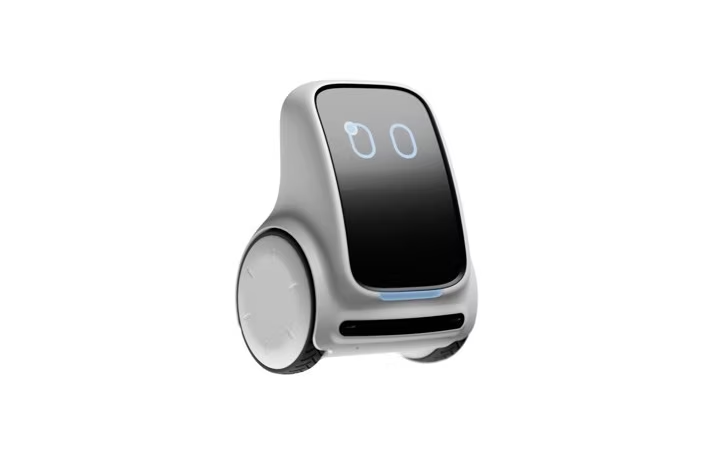
Paper and talk · KSDS Fall 2026
Capable but Not Scalable
Turning CAD models into multi-view images shapes what AI models learn and what people judge. We rated eleven tools against fourteen requirements: almost every requirement can be met, but only through code or a manual step repeated for every product.
(a) Inconsistent
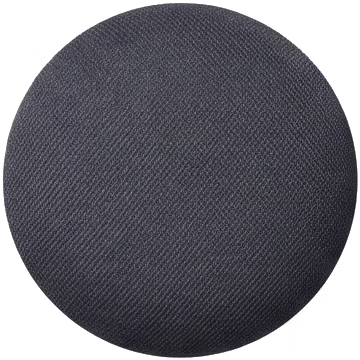 almost disappears
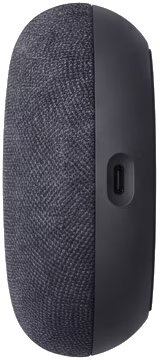

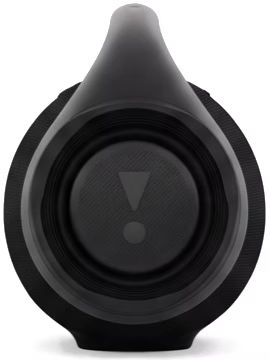 looks taller
(b) Consistent
About the paper
Capable but Not Scalable: Requirements and Interaction Costs of Building Multi-View CAD Datasets for Design Research
D. Sarfraz, S. Lee, U. V. U. Ismatullaev, J. Kim, A. Donierbek and K. Kim, HCDT, UNIST
2026 KSDS Fall International Conference, 28 November 2026, Yonsei University International Campus, Incheon
Read this page in Korean
Scan the code with your phone’s camera to open this page in Korean, or open it here. 한국어로 보기
Why it matters
Every rendering choice reaches both the AI model and the people who rate the images. If sizes aren’t normalized, a model may learn that small parts look small rather than learning their form. If the “front” camera points at a different side of each product, nobody compares like with like. If appearance tracks where a file came from, a model takes the shortcut.2 For design researchers, the problem lies less in what tools can do than in how the work scales.
Ten sources, no shared way of rendering
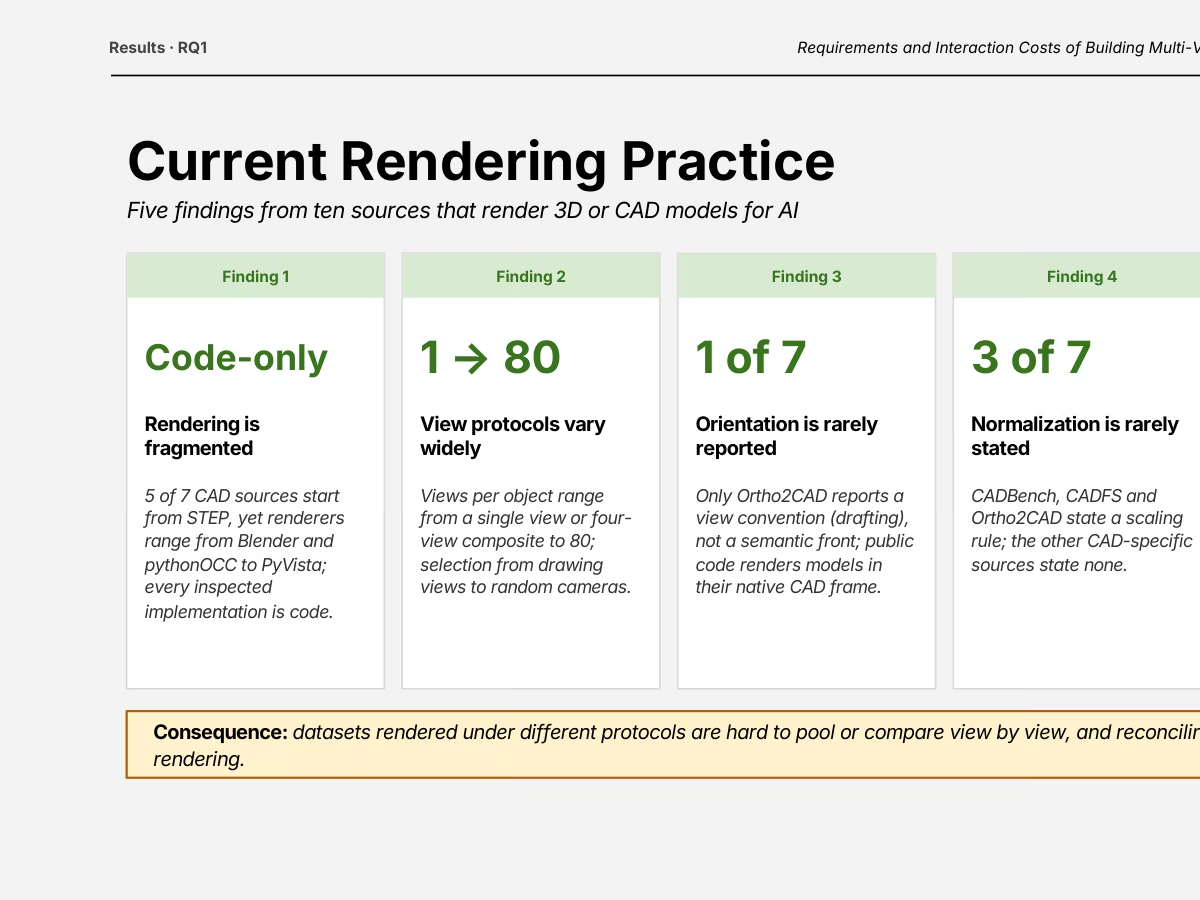
We coded ten sources that render 3D or CAD models into images for AI, from two foundational multi-view studies and the Objaverse-XL script to seven CAD studies from 2024 to 2026, on eight attributes from input format to projection. Turning CAD into images is data work: often undervalued, yet model quality depends on it.1
Rendering is fragmented. Five of the seven CAD sources start from STEP files, yet renderers range from Blender and pythonOCC to PyVista, and every implementation we inspected is code.
View protocols vary widely. From a single view or a four-view composite to 80 views, chosen as drawing views, fixed angles or random cameras.
Orientation is rarely reported. Only Ortho2CAD states a view convention, and it follows drafting rather than a product’s front. Public code renders models in their native CAD frame.
Normalization is rarely stated. CADBench, CADFS and Ortho2CAD give a scaling rule; the other CAD sources give none.
Projection and appearance vary. Orthographic views for drawing-like tasks, perspective for photo-like ones. In one study, perspective distortion degraded its vision-language annotations.
What follows. Datasets rendered under different protocols are hard to pool or to compare view by view, and reconciling them may mean rendering them all again.
Fourteen requirements, for the images and for the work
Eleven say what the images must be, from input to output, so that they serve a model, a human evaluator or both. Three say what the researcher must be able to do. Which ones matter depends on the research question.
-
1
Input
R1 Native STEP import, with meshing that scales with the product’s size.
-
2
Geometry
R2 Uniform scaling to a reference size. R3 Centering, framing and clipping checks. R4 A semantic front and view labels.
-
3
View protocol
R5 One fixed view set for all products. R6 Shared framing within a product.
-
4
Observation
R7 Orthographic and perspective views. R8 A clay baseline under matched conditions. R9 Aligned mask, depth and normal passes.
-
5
Output
R10 Output grouped by product, with data splits. R11 Provenance and scale for every sample.
-
6
Interaction
R12 Operations on the whole collection. R13 A reusable, shareable protocol preset. R14 Collection-wide checks and correction.
Which side is the front?
For a designer, the front is the face people look at: a property of the product, not a fixed axis (R4). A speaker’s front faces a horizontal camera, so the renderer’s Front view already shows it. A mouse’s front faces up, so the same camera sees only its nose. One fixed axis can’t fit every product: the tool should propose a front, and the researcher confirm it.
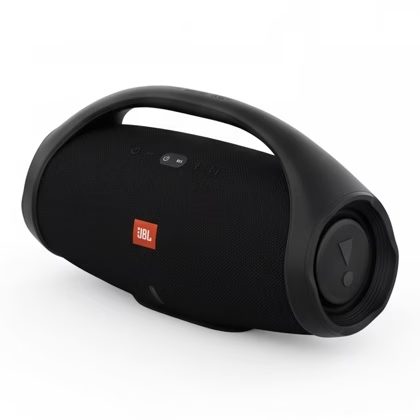
Speakerfront face upright
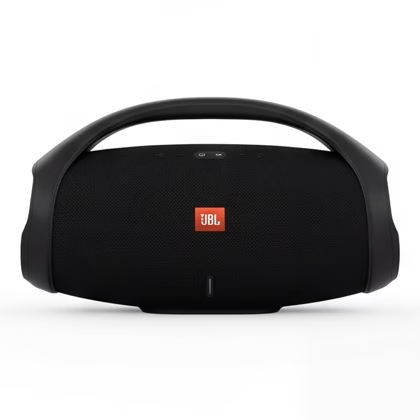
Match
The Front camera already shows the face.

Mousefront face points up
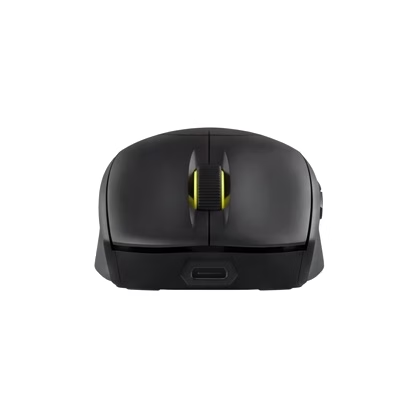

Mismatch
The Front camera shows only the nose; the researcher relabels the Top view as the front.
Proportion, not absolute size
A 5 mm fillet reads as soft on a 150 mm remote but almost sharp on an 800 mm cabinet. For studies of relative form, scale every product uniformly to a declared reference dimension, which keeps every ratio, and store the original size and scale factor with each image (R2, R11).
One product, one split
If views of one product fall in both the training and the test set, a model scores well by recognizing products it has already seen from another angle (R10). Splits for unseen products should also keep duplicates and close variants of a design together.
Eleven tools: almost everything is possible, little of it scales
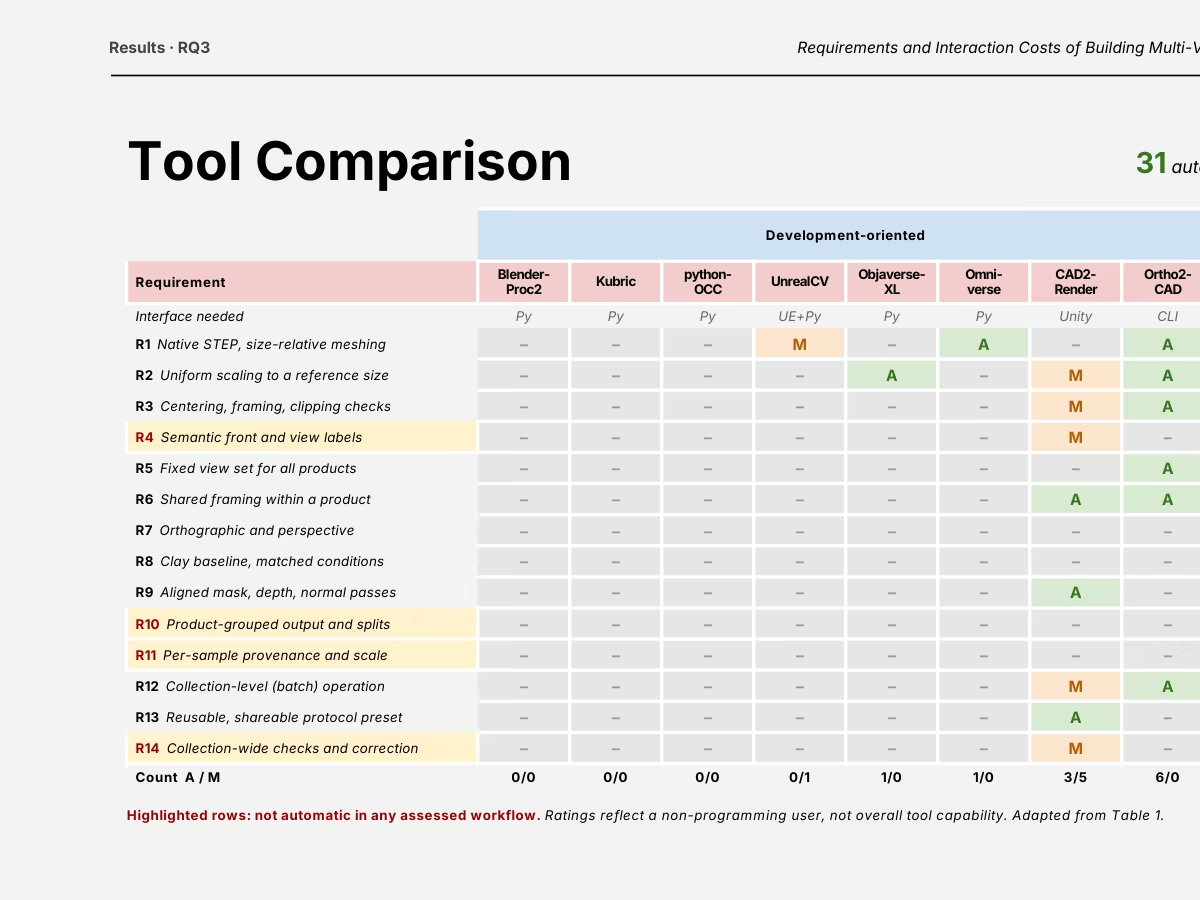
We rated each tool for a researcher who can configure documented interfaces and run an existing script but doesn’t write code, on one reference task: rendering 300 STEP files of consumer products with a fixed view set, a clay baseline and normalization to the largest dimension, grouped by product with provenance.
| Development-oriented | Design-oriented | ||||||||||
|---|---|---|---|---|---|---|---|---|---|---|---|
| Requirement | Blender | Kubric | python | Unreal | Objaverse- | Omni | CAD2 | Ortho2 | Blender | Key | Rhino 8 |
| Interface needed | Py | Py | Py | UE + Py | Py | Py | Unity | CLI | GUI | GUI | GUI |
| R1 Native STEP, size-relative meshing | – | – | – | M | – | A | – | A | – | A | A |
| R2 Uniform scaling to a reference size | – | – | – | – | A | – | M | A | M | M | M |
| R3 Centering, framing, clipping checks | – | – | – | – | – | – | M | A | M | M | M |
| R4 Semantic front and view labels | – | – | – | – | – | – | M | – | M | M | M |
| R5 Fixed view set for all products | – | – | – | – | – | – | – | A | A | A | A |
| R6 Shared framing within a product | – | – | – | – | – | – | A | A | A | A | A |
| R7 Orthographic and perspective | – | – | – | – | – | – | – | – | A | A | A |
| R8 Clay baseline, matched conditions | – | – | – | – | – | – | – | – | A | M | A |
| R9 Aligned mask, depth, normal passes | – | – | – | – | – | – | A | – | A | A | A |
| R10 Product-grouped output and splits | – | – | – | – | – | – | – | – | M | M | M |
| R11 Per-sample provenance and scale | – | – | – | – | – | – | – | – | M | M | M |
| R12 Collection-level (batch) operation | – | – | – | – | – | – | M | A | M | A | M |
| R13 Reusable, shareable protocol preset | – | – | – | – | – | – | A | – | A | A | A |
| R14 Collection-wide checks and correction | – | – | – | – | – | – | M | – | M | M | M |
| Automatic / manual | 0 / 0 | 0 / 0 | 0 / 0 | 0 / 1 | 1 / 0 | 1 / 0 | 3 / 5 | 6 / 0 | 6 / 7 | 7 / 7 | 7 / 7 |
A Automatic for every product once configuredM A manual step for each product, or a workaround– Needs code, or unsupported
Highlighted requirements are automatic in no tool. Ratings describe what a non-programming user can reach, not a tool’s overall capability. Of the 154 cells, 31 are automatic and 27 manual. Adapted from Table 1.
Easy to start, but fixed. The Ortho2CAD generator normalizes, centers and frames a whole folder of STEP files without code edits, but changing its protocol means editing code.
Powerful, but only through code. BlenderProc2, Kubric, Omniverse, UnrealCV and pythonOCC offer building blocks for nearly every requirement. Once a script exists, a change is a small edit; writing it is the barrier.
No code, but repeated by hand. In Blender, KeyShot and Rhino a template scene keeps the views, framing, projection and passes, while scaling, the front, output, provenance and checks stay manual for every product.
“The gap is scalability, not capability.”
Toward a tool for designers
Walking through five actions of the reference task traced each cost to a known property of tools, such as repetition viscosity or hidden dependencies.3 Each one points to what a better tool should do.
-
1
A preset, with code kept
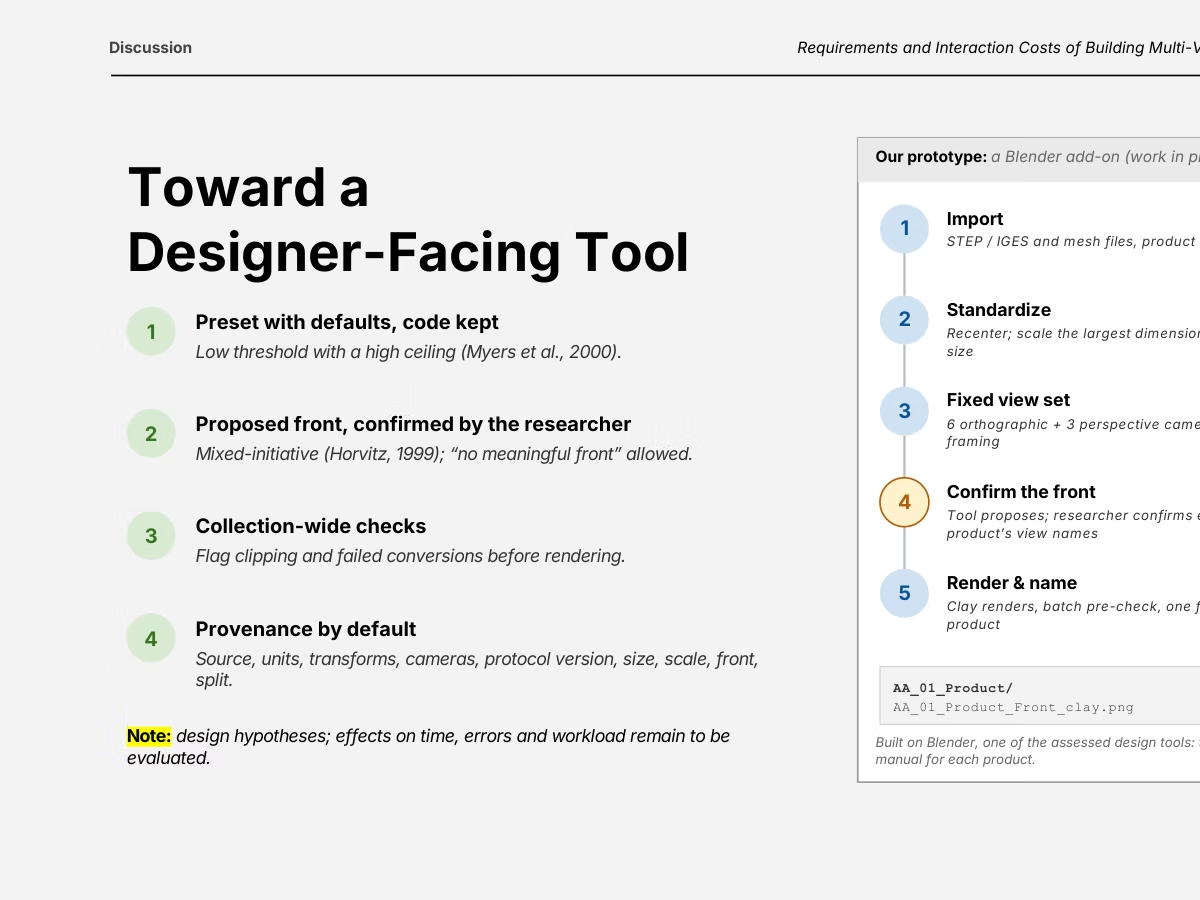
Start from sensible defaults, keep code for extension, and apply a changed protocol to every product at once: a low threshold with a high ceiling.4
-
2
A proposed front, confirmed
The tool proposes each product’s front, and the researcher confirms or corrects it in a grid of the whole collection.5 “No meaningful front” is a valid answer.
-
3
Collection-wide checks
The same grid flags clipped views and failed conversions before rendering, not one product at a time or after the run.
-
4
Provenance by default
Source, units, transforms, cameras, protocol version, original size, scale factor, front and split, written with every sample.6
The prototype, a Blender add-on
Work in progress. Built on Blender, one of the tools we assessed, it takes over the steps Blender leaves manual for each product.
Import
STEP, IGES and mesh files, product by product (R1).
Standardize
Recenter, and scale the largest dimension to a fixed size (R2, R3).
Fixed view set
Six orthographic and three perspective cameras with one framing (R5, R6, R7).
Confirm the front
The tool proposes; the researcher confirms each product’s view names (R4).
Render and name
Clay renders, a batch pre-check and one folder per product (R8, R10, R14).
Limitations. This is an analytical study: we made the ratings and the walkthrough ourselves, on one reference task, without participants. An M shows where manual work remains, not how much effort it takes. The ten practice sources were not drawn from a systematic search, and the ratings reflect public documentation only. The design implications are hypotheses; their effect on time, errors and workload is still to be measured.
Next. Build the collection-level tool, then test the data, by varying normalization, view set, projection and appearance and measuring the effect on model learning and on human ratings, and the interaction, by comparing manual, scripted and collection-level workflows with design researchers.
The slides
The talk at the 2026 KSDS Fall International Conference. Open the whole talk or one part, then step through with the arrows, arrow keys or a swipe.
-
 28 November 2026 · KSDS Fall 2026
- Title slide: Capable but Not Scalable, by Danyal Sarfraz, SeEun Lee, Ulugbek Ismatullaev, JoungHyun Kim, Abdurakhimov Donierbek and KwanMyung Kim, HCDT, UNISTTitle
- From CAD models to image datasets: the design researcher renders CAD into multi-view images that both human evaluators and an AI model consumeFrom CAD models to image datasets
- Rendering is not neutral: unnormalized sizes, a front that points at a different side, and appearance that tracks the file source become hidden variablesRendering is not neutral
- The three research questions: 10 sources on rendering practice, 14 requirements, and 11 tools compared through cognitive dimensionsResearch questions
- Three lines of prior work: view-based learning, CAD data and dataset quality, and analysing tools without usersThree lines of prior work
- An HCI lens for rendering tools: threshold and ceiling, repetition viscosity, hidden dependencies, visibility, closeness of mapping, error-proneness and learning barriersAn HCI lens for rendering tools
- Research methods: practice analysis and requirements, then a tool comparison and a walkthrough of five task actionsResearch methods
- The reference task, 300 STEP files of consumer products, and the A, M and dash rating schemeReference task and rating scheme
- Current rendering practice: five findings from ten sources, from code-only rendering to unreported orientation and normalizationCurrent rendering practice
- Fourteen requirements grouped into input, geometry, view protocol, observation, output and interactionFourteen requirements
- Which side is the front? A speaker matches the fixed front camera; a mouse does notWhich side is the front?
- Consistency and proportion: a mini speaker and a boombox rendered inconsistently and consistentlyConsistency and proportion
- Tool comparison: fourteen requirements rated across eleven tools, 31 automatic and 27 manualTool comparison
- Three routes, one gap: ready-made scripts, frameworks and design tools each lack one property design research needsThree routes, one gap
- Walkthrough of the reference task: five actions traced to an HCI concept and a design implicationWalkthrough of the reference task
- Toward a designer-facing tool: four design implications and the Blender add-on prototype in five stepsToward a designer-facing tool
- Limitations and future work: build the tool, then evaluate the data and the interactionLimitations and future work
- Conclusion: capable but not scalable, with one finding per research questionConclusion
- Thank you slide with the funding acknowledgement, a QR code to this page in Korean and a QR code to the portfolioThank you
-
 28 November 2026 · KSDS Fall 2026
- Title slide: Capable but Not Scalable, by Danyal Sarfraz, SeEun Lee, Ulugbek Ismatullaev, JoungHyun Kim, Abdurakhimov Donierbek and KwanMyung Kim, HCDT, UNISTTitle
- From CAD models to image datasets: the design researcher renders CAD into multi-view images that both human evaluators and an AI model consumeFrom CAD models to image datasets
- Rendering is not neutral: unnormalized sizes, a front that points at a different side, and appearance that tracks the file source become hidden variablesRendering is not neutral
- The three research questions: 10 sources on rendering practice, 14 requirements, and 11 tools compared through cognitive dimensionsResearch questions
- Three lines of prior work: view-based learning, CAD data and dataset quality, and analysing tools without usersThree lines of prior work
- An HCI lens for rendering tools: threshold and ceiling, repetition viscosity, hidden dependencies, visibility, closeness of mapping, error-proneness and learning barriersAn HCI lens for rendering tools
- Research methods: practice analysis and requirements, then a tool comparison and a walkthrough of five task actionsResearch methods
- The reference task, 300 STEP files of consumer products, and the A, M and dash rating schemeReference task and rating scheme
- Current rendering practice: five findings from ten sources, from code-only rendering to unreported orientation and normalizationCurrent rendering practice
-
 28 November 2026 · KSDS Fall 2026
- Fourteen requirements grouped into input, geometry, view protocol, observation, output and interactionFourteen requirements
- Which side is the front? A speaker matches the fixed front camera; a mouse does notWhich side is the front?
- Consistency and proportion: a mini speaker and a boombox rendered inconsistently and consistentlyConsistency and proportion
- Tool comparison: fourteen requirements rated across eleven tools, 31 automatic and 27 manualTool comparison
- Three routes, one gap: ready-made scripts, frameworks and design tools each lack one property design research needsThree routes, one gap
-
 28 November 2026 · KSDS Fall 2026
- Walkthrough of the reference task: five actions traced to an HCI concept and a design implicationWalkthrough of the reference task
- Toward a designer-facing tool: four design implications and the Blender add-on prototype in five stepsToward a designer-facing tool
- Limitations and future work: build the tool, then evaluate the data and the interactionLimitations and future work
- Conclusion: capable but not scalable, with one finding per research questionConclusion
- Thank you slide with the funding acknowledgement, a QR code to this page in Korean and a QR code to the portfolioThank you